
Download Eadlyn – AI‑Powered Portrait & Voice Cloning Tool
Overview – Revive Memories with Cutting‑Edge AI
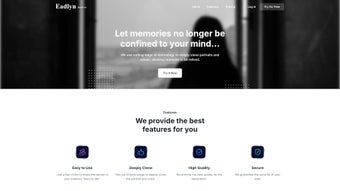
Eadlyn is a web‑based application that harnesses advanced artificial intelligence to clone portraits and voices, letting users relive cherished moments with astonishing realism. By uploading a photo or a short audio sample, the platform creates a high‑quality digital replica that can be used for personal projects, entertainment, or heartfelt tributes. The service is built around a user‑friendly interface that walks you through three simple steps: upload, process, and download. Whether you want to preserve a grandparent’s smile, recreate a favorite family song, or simply experiment with digital art, Eadlyn makes the experience accessible to anyone with an internet connection.
Security is a core pillar of Eadlyn’s design. All uploaded media are encrypted in transit and stored only for the duration needed to generate the clone. The company explicitly states that it never sells user data, and users retain full ownership of the resulting assets. Subscription plans range from a free tier that offers a limited number of daily voice models to premium packages that unlock unlimited cloning, higher resolution outputs, and priority processing. This flexibility ensures that hobbyists, creators, and professionals alike can find a pricing model that fits their needs.
The AI models behind Eadlyn have been trained on massive datasets of faces and speech patterns, allowing them to capture subtle nuances such as facial expressions, breathing sounds, and intonation. The result is a “digital life” that feels both authentic and respectful, offering a unique way to keep loved ones close, even across distance or time.
Key Features & Benefits
- High‑Fidelity Portrait Cloning – Generates photorealistic images that preserve skin texture, lighting, and emotional expression.
- Voice Replication Engine – Produces natural‑sounding speech from a few seconds of audio, supporting multiple languages and accents.
- Simple 3‑Step Workflow – Upload, process, and download with guided prompts, no technical expertise required.
- Secure Data Handling – End‑to‑end encryption, temporary storage, and strict privacy policies keep personal media safe.
- Scalable Subscription Plans – Free daily voice models, hobbyist tier, professional tier, and enterprise solutions.
- Cross‑Platform Accessibility – Fully web‑based; works on any modern browser across Windows, macOS, Linux, Android, and iOS.
- Creative Export Options – Download images in PNG/JPEG, voices in MP3/WAV, and receive project files for further editing.
- AI‑Assisted Editing Tools – Adjust facial features, lighting, and vocal tone after generation for fine‑tuning.
- Community & Support – Active forum, tutorials, and responsive help desk for troubleshooting and inspiration.
Beyond the raw capabilities, Eadlyn offers tangible benefits that resonate with a wide audience. Families use the tool to create memorable video messages for birthdays or anniversaries, preserving the unique timbre of a loved one’s voice for future generations. Content creators embed realistic avatars into podcasts, livestreams, or virtual reality experiences, saving time and production costs. Educators can generate historical figures’ voices for immersive lessons, while genealogists bring ancestral portraits to life for deeper storytelling.
Because the service runs entirely in the cloud, there’s no need for powerful local hardware. Even users on modest laptops or tablets can produce studio‑grade results, as the heavy lifting is performed by Eadlyn’s backend AI clusters. This democratization of high‑tech media production is at the heart of the platform’s mission: to make AI‑driven memory preservation simple, secure, and affordable.
Installation, Usage & Compatibility
Getting Started – No Download Required
Since Eadlyn is a web‑based SaaS solution, there is no traditional installation process. To begin, navigate to eadlyn.com using any up‑to‑date browser (Chrome, Firefox, Edge, Safari). The site will automatically detect your operating system and recommend the optimal view mode—desktop or mobile. Create a free account by providing an email address and setting a password; you’ll receive a verification link to activate the profile.
Once logged in, the dashboard presents three clear tabs: Portrait, Voice, and My Projects. Selecting Portrait opens an upload window where you can drag‑and‑drop an image file (JPEG, PNG, or HEIC). Eadlyn’s AI instantly analyses facial landmarks and suggests a cloning style (classic portrait, cartoon, or hyper‑real). After confirming the settings, click Generate. Processing typically takes 30 seconds to 2 minutes depending on image resolution and server load.
Voice Cloning Workflow
For voice cloning, the Voice tab accepts up to 60 seconds of clear audio (MP3, WAV, or OGG). The platform recommends a quiet environment and a consistent speaking pace for best results. Once uploaded, the AI extracts phonetic patterns, timbre, and cadence, then synthesizes a voice model that can be used to read any supplied text. Users can preview the output, adjust speed or pitch, and finally download the audio file.
System Requirements & Browser Compatibility
Eadlyn operates flawlessly on Windows 10/11, macOS 12+, Linux distributions with modern browsers, as well as Android 8+ and iOS 13+. Minimum requirements are modest: an internet connection of at least 5 Mbps, a browser supporting WebGL and HTML5, and JavaScript enabled. Because the heavy AI computation occurs on Eadlyn’s servers, local CPU or GPU specifications have little impact on performance.
For users who prefer offline work, Eadlyn offers a lightweight desktop wrapper built on Electron, which mirrors the web experience while allowing batch processing. The wrapper is available for Windows and macOS, with automatic updates ensuring you always run the latest security patches.
Overall, the onboarding experience is designed to be frictionless. The platform provides contextual tooltips, a searchable knowledge base, and video tutorials that guide first‑time users through each step, making the technology approachable even for non‑technical audiences.
Pros & Cons – A Balanced Look
Advantages
- Exceptional realism in both portrait and voice outputs.
- Fully web‑based; no heavy hardware required.
- Robust privacy measures with end‑to‑end encryption.
- Flexible pricing that includes a generous free tier.
- Multi‑language support and cross‑platform compatibility.
- Integrated editing tools for fine‑tuning results.
- Responsive customer support and active community forum.
Limitations
- Processing time can increase during peak usage periods.
- Free tier imposes daily limits on voice model generation.
- High‑resolution portrait cloning is reserved for paid plans.
- Audio quality may degrade slightly if source recordings are noisy.
- Legal considerations require careful handling of copyrighted voices.
When weighing these points, it’s clear that Eadlyn excels in delivering high‑quality, secure AI cloning while maintaining accessibility. The primary trade‑off lies in the premium features that are gated behind subscription tiers, which is a common model for AI‑intensive services. Users who need occasional cloning will find the free plan sufficient, whereas professionals looking for batch processing and enterprise‑grade outputs should consider the higher‑level subscriptions.
FAQ & Final Thoughts – Is Eadlyn Right for You?
How secure is my personal data on Eadlyn?
Eadlyn uses TLS 1.3 encryption for all data transfers and stores uploaded media in encrypted containers that are automatically deleted after processing. The privacy policy states that the user retains full ownership of generated assets, and no data is sold to third parties.
Can I use the cloned voice for commercial projects?
Yes, provided you have the appropriate rights to the source audio. Eadlyn’s commercial license, included in the professional and enterprise plans, grants permission to use generated voices in advertisements, podcasts, and other revenue‑generating content.
What file formats are supported for download?
Portraits can be saved as PNG or JPEG, while voice outputs are available in MP3 and WAV. Premium users also receive lossless FLAC options for audio.
In conclusion, Eadlyn stands out as a secure, versatile, and user‑friendly solution for anyone looking to preserve memories through AI‑driven portrait and voice cloning. Its cloud‑first architecture removes hardware barriers, while the tiered pricing structure ensures that both casual users and professionals can access the level of quality they need. If you’re searching for a tool that combines cutting‑edge technology with strong privacy safeguards, Eadlyn is a compelling choice.
Ready to bring your memories back to life? Create your free account today and start experimenting with AI‑generated portraits and voices. Upgrade anytime to unlock higher resolutions, unlimited models, and priority processing—because the moments that matter deserve the best possible preservation.



.png)



